
Address Book
The Address Book stores the people, venues, companies, hotels, agencies, and other outside relationships your agency works with. It is separate from the artist roster, but it connects to artists, shows, contracts, invoices, documents, analytics, and travel workflows.
Business records and people
The Address Book has two record families:
| Record family | What it represents | Created with |
|---|---|---|
| Business | A venue, promoter, festival, agency, hotel, company, private buyer, or other organization. | Add Business |
| Person | A named individual such as a buyer, accountant, production contact, assistant, manager, artist contact, band member, or traveller. | Add Person |
Use a business record for the organization or place that can be reused across shows. Use a person record for the individual you communicate with, travel with, invite, or attach as a contact. Linking the two is usually better than typing a person's name into a notes field because the same person can appear again on another venue, organizer, artist, or show.
What to store as a business
| Record | Examples | Why it matters |
|---|---|---|
| Venues | Clubs, theatres, rooms, halls, and other places where shows happen. | Venue records can carry addresses, coordinates, capacity, venue-specific address data, and show history. |
| Promoters and festivals | Buyers, organizers, festivals, promoters, and presenting partners. | Events, contracts, invoices, and analytics can refer back to the same organizer instead of retyping them. |
| Agencies, hotels, corporate, private, and other contacts | Co-agencies, suppliers, hotels, brands, private buyers, and miscellaneous business relationships. | Keeps non-roster business relationships reusable across shows and documents. |
Contacts can be reused across events and documents. This avoids retyping organizer, venue, counterparty, and contact-person details for every show.
Views, search, and filters
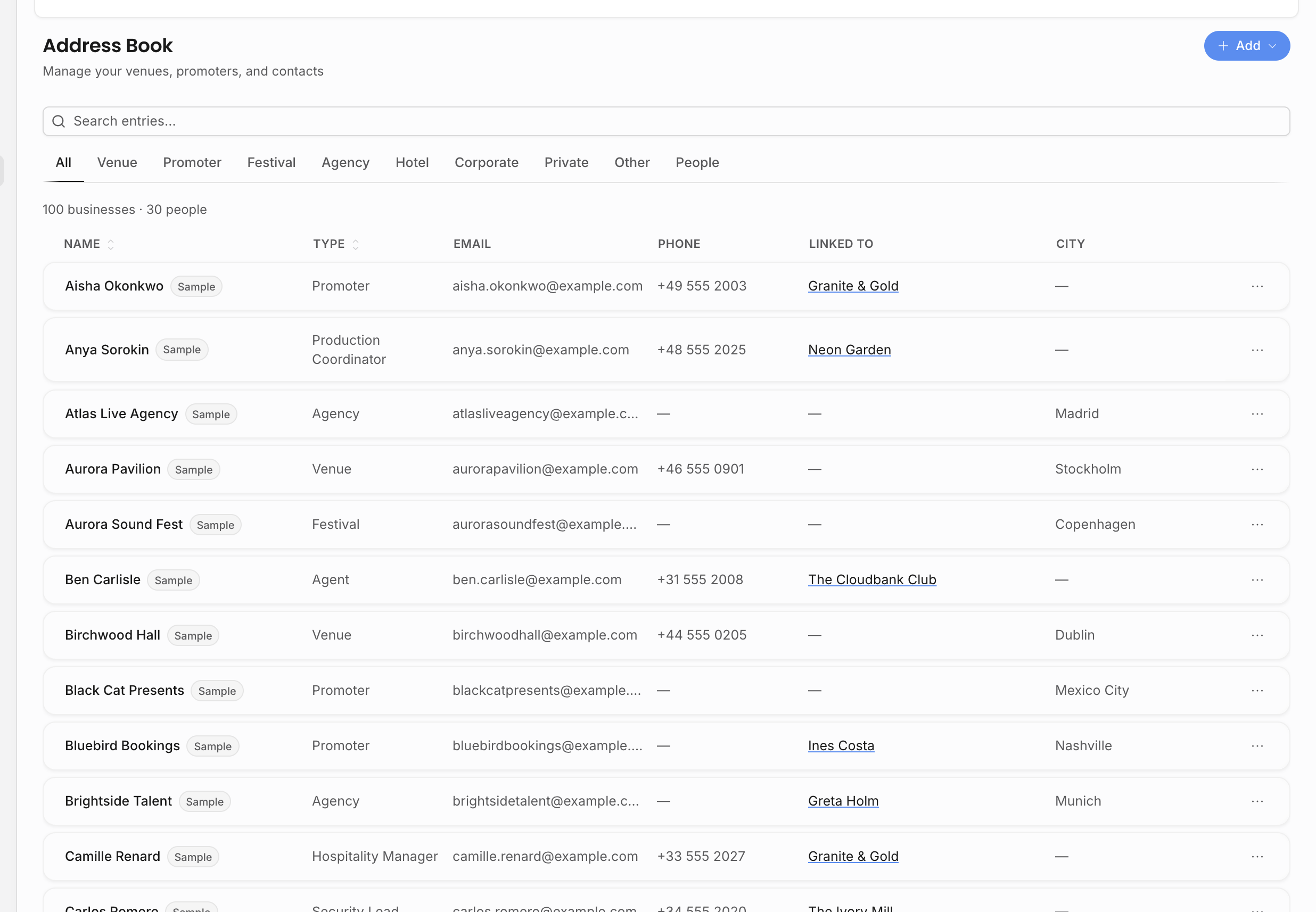
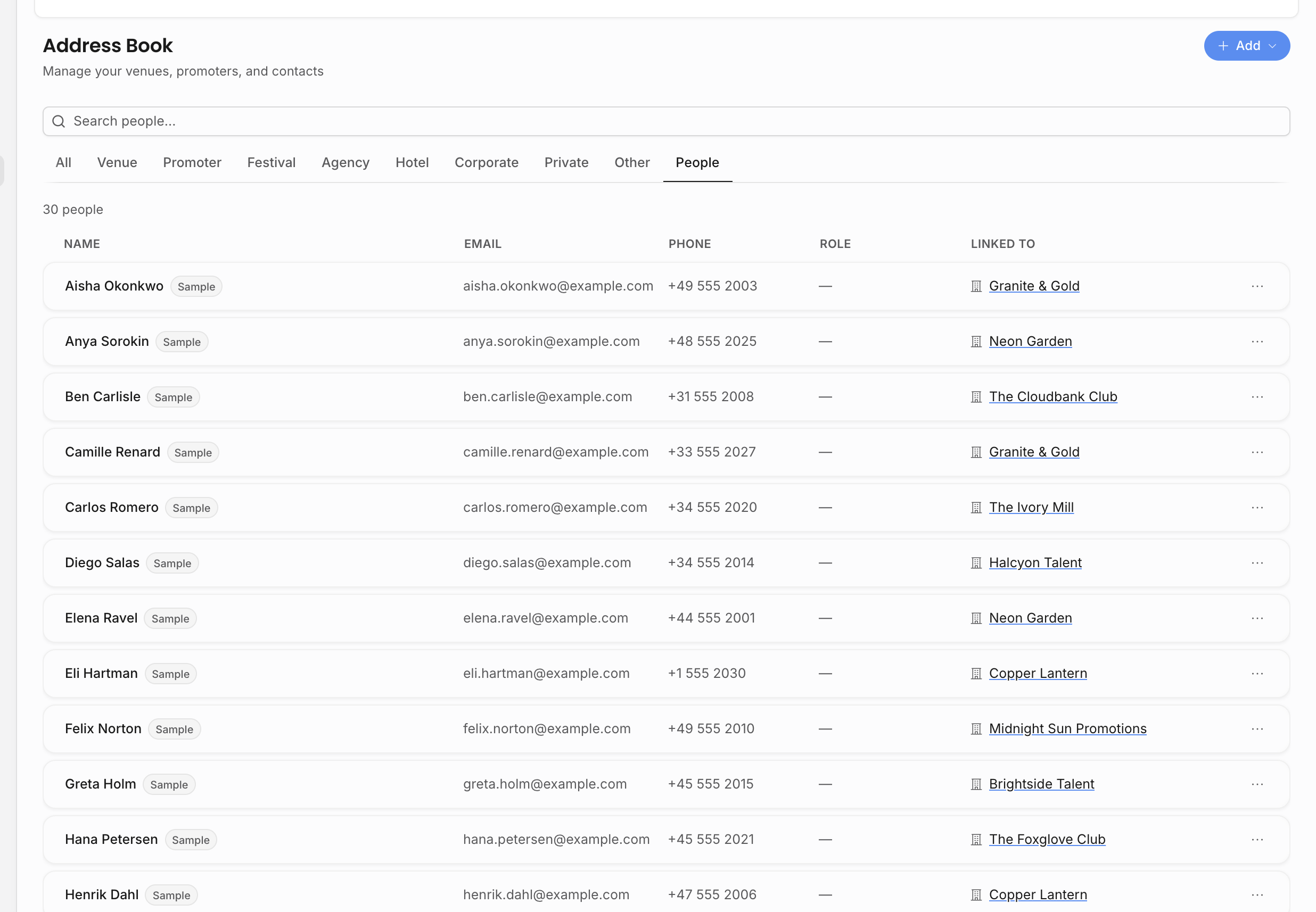
The Address Book has an All view, type-specific business views, and a People view. Use them as different working views: one for all relationships, one for a particular business type, and one for named individuals.
| View | What it shows |
|---|---|
| All | A combined alphabetical stream of business records and people. The table shows name, type, email, phone, linked-to context, and city. |
| Venue, Promoter, Festival, Agency, Hotel, Corporate, Private, Other | Only business records of that type, with business-specific columns such as contact person and address. |
| People | Individual people, including role and linked businesses or artists. |
Browse mode loads more rows as you scroll, so large agencies can keep browsing without waiting on the entire address book at once. Counts update for the active view: All shows combined business/person totals, business tabs show type-specific totals, and People shows the people total.
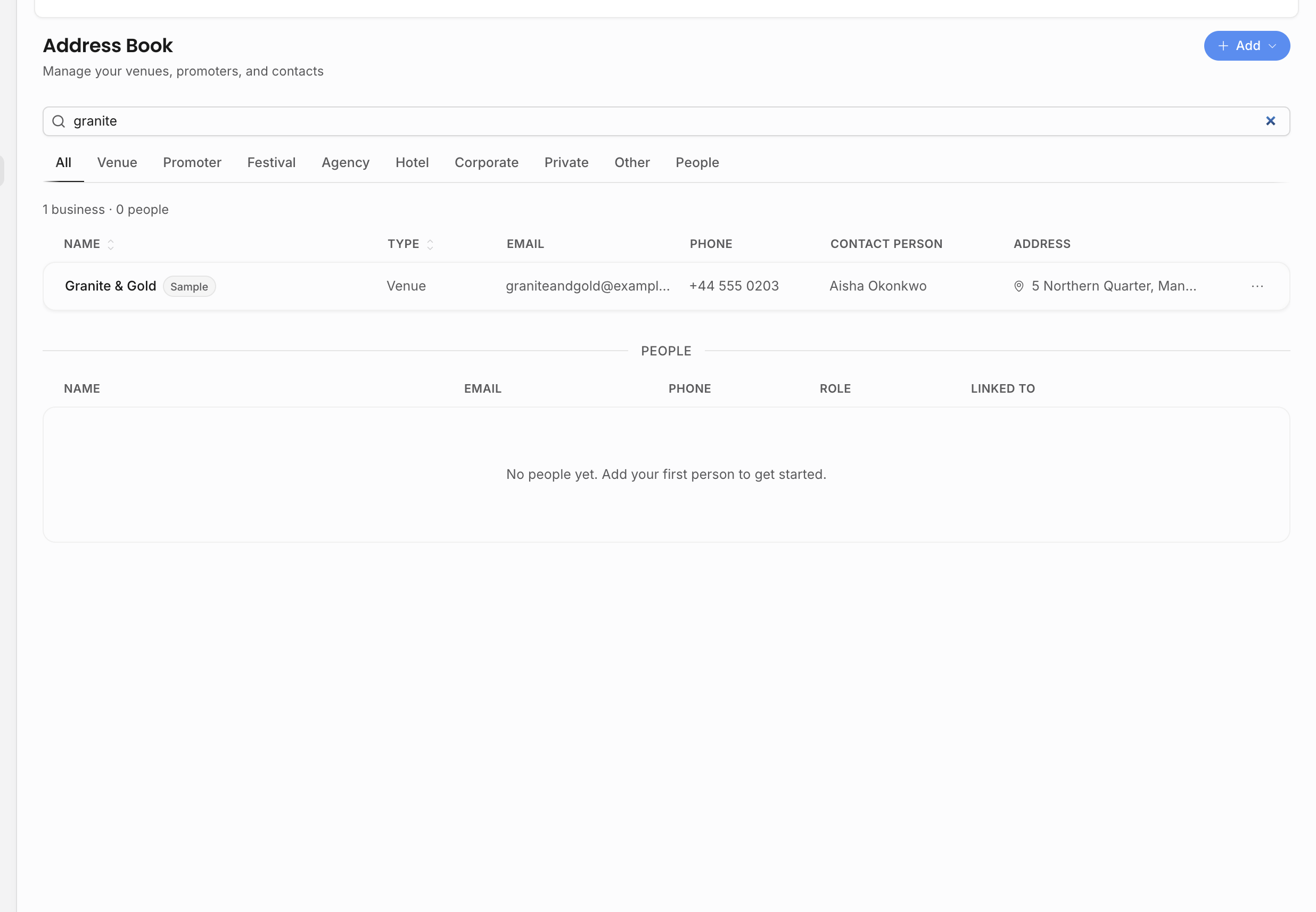
Search looks across the Address Book, not only the rows currently visible on screen. It searches business name, email, city, country, and address; for people it searches name, first name, last name, email, company, job title, and role. If a broad query returns too much, narrow it with a more specific name, city, company, or role.
When you search in All, Offstage shows business matches and people matches as separate result sections. The split view makes it clearer which matches are organizations and which are people.
The URL keeps the active search and type filter, so links such as /address-book?type=VENUE&q=Berlin can open directly to venues matching Berlin. Analytics uses this pattern when it sends you to venues or cities that need better address data.
Business record details
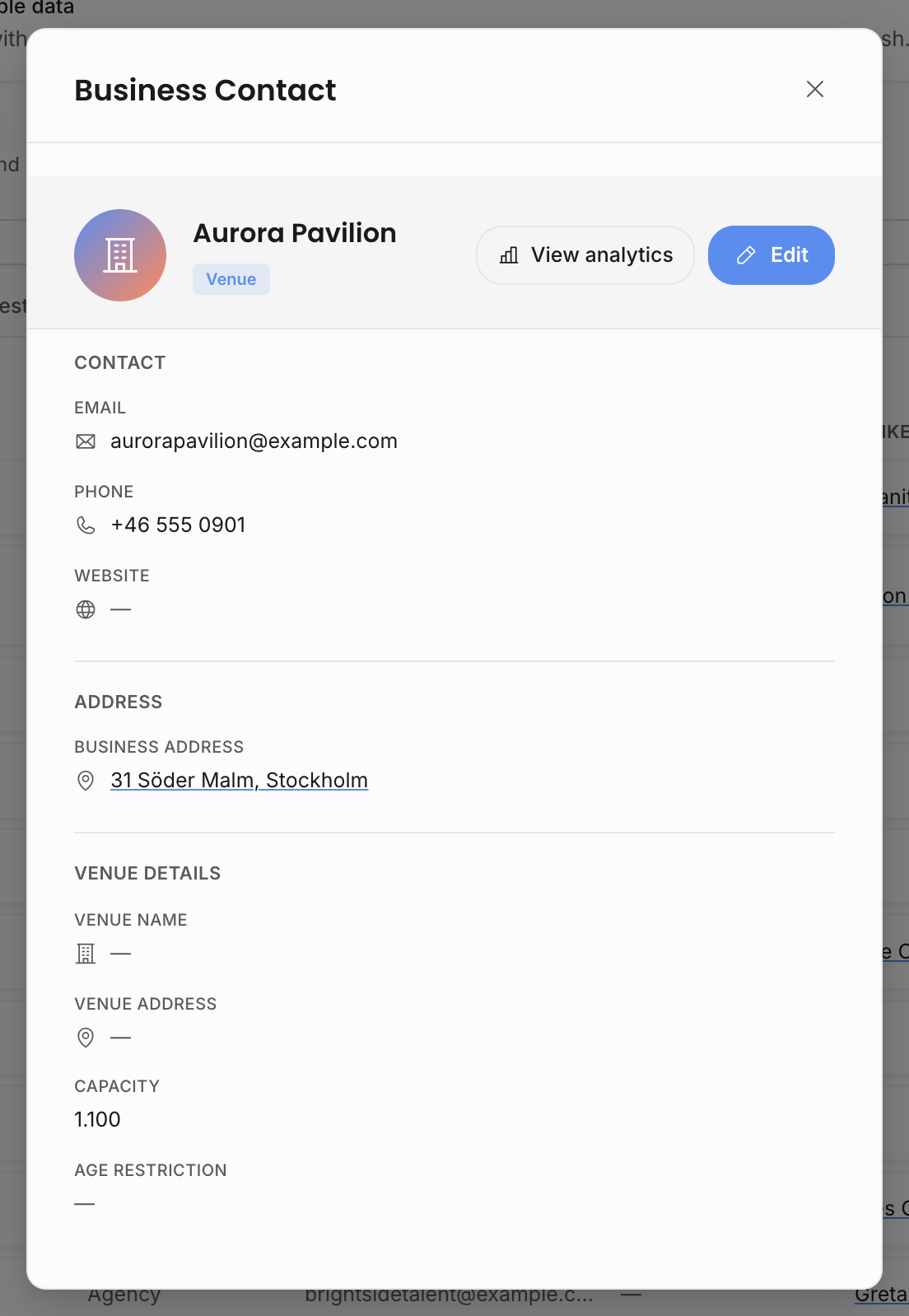
Business records open in a detail modal and edit in the same Address Book form. The form is organized by sections so the team can fill only the parts that matter for that relationship.
| Section | What it stores |
|---|---|
| Overview | Name, business type, email, phone, website, notes, business address, and linked people. |
| Venue Details | Venue name, venue address, coordinates, capacity, and age restriction. This section appears for venue records. |
| Artists | Artist links for agency-type contacts. Use this when an outside agency represents or is connected to roster artists. |
| Billing | Billing name, billing address, billing email, billing CC emails, VAT number, and payment terms. |
| Banking | Bank name, account holder, IBAN, BIC/SWIFT, account number, routing/sort code, currency, and banking notes. |
The business name field can use place search. Business and venue addresses can use address autocomplete, or manual entry when autocomplete cannot find the location. For venue records, keep the actual venue address separate from the legal or billing address when they differ.
The form can copy stable contact details into venue or billing fields when those fields are empty. Use that to avoid retyping, but keep show-specific exceptions on the show, contract, invoice, or document rather than overwriting the reusable address-book record.
Linking people to businesses and artists
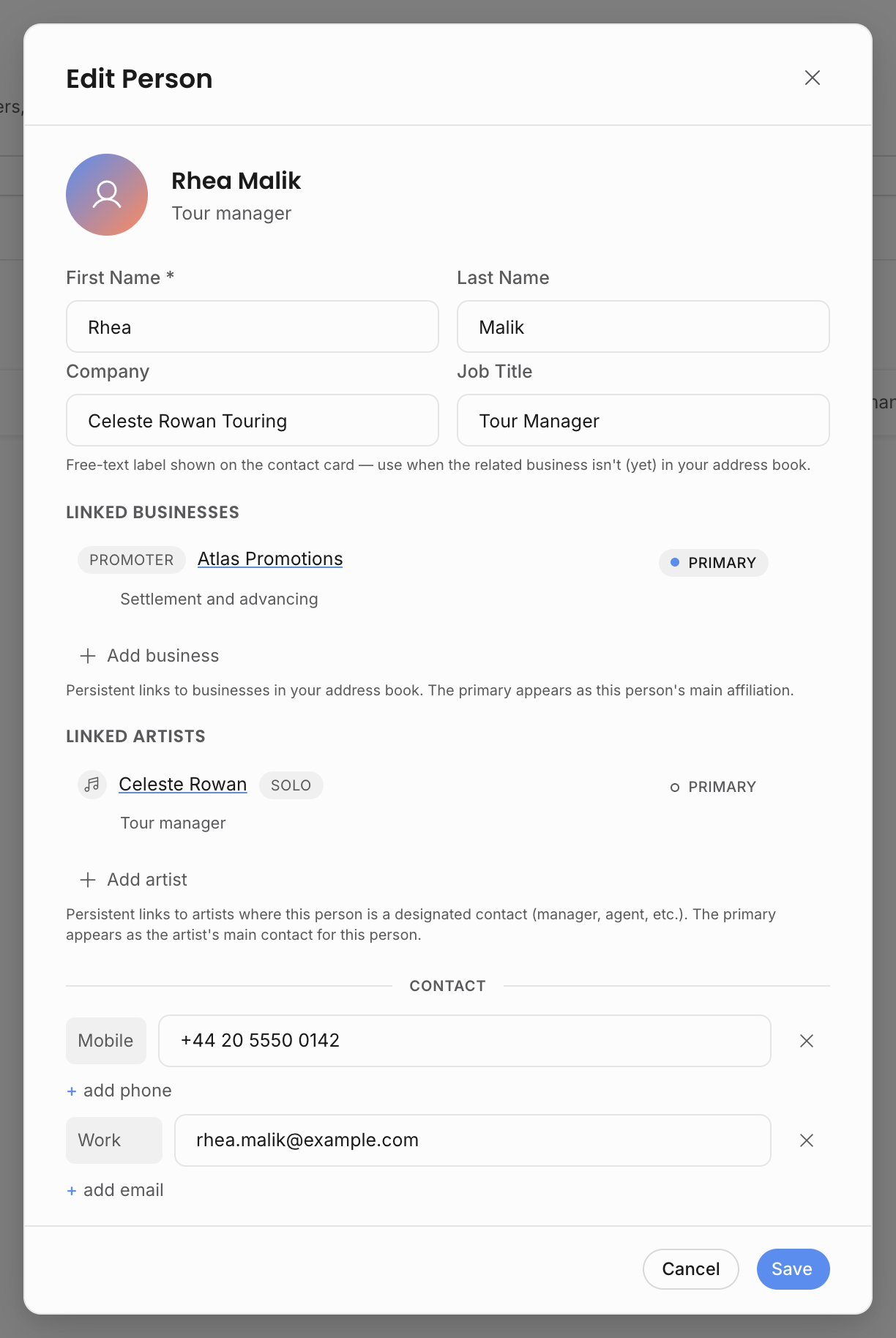
People can be linked to company records. Use these links when an event has a venue or organizer but the day-to-day contact is a specific person.
Each link can have a role, such as buyer, accountant, production, assistant, tour manager, manager, agent, or general contact. One person can be marked primary for a business, and one person can be marked primary for an artist contact relationship. When you choose a new primary contact, Offstage updates the previous primary link for that relationship.
Person links are edited after the person exists. When you create a new person, save the person first, then edit them to add linked businesses or linked artists. This keeps the person record and the relationship rows separate: the person stores identity and contact details, while the link stores the role and primary status for a specific business or artist.
Use business-person links for external organizations. Use artist-person links when the person is a manager, agent, assistant, band member contact, or other named contact for a roster artist. A person can appear in both contexts if they really play both roles.
Linked names are interactive in the Address Book. From a business row, you can open the linked person. From a person row, you can open the linked business. In edit mode, you can change the relationship role, set a different primary link, remove a link, or add another business or artist without rewriting the person's base contact details.
Person details and sensitive fields
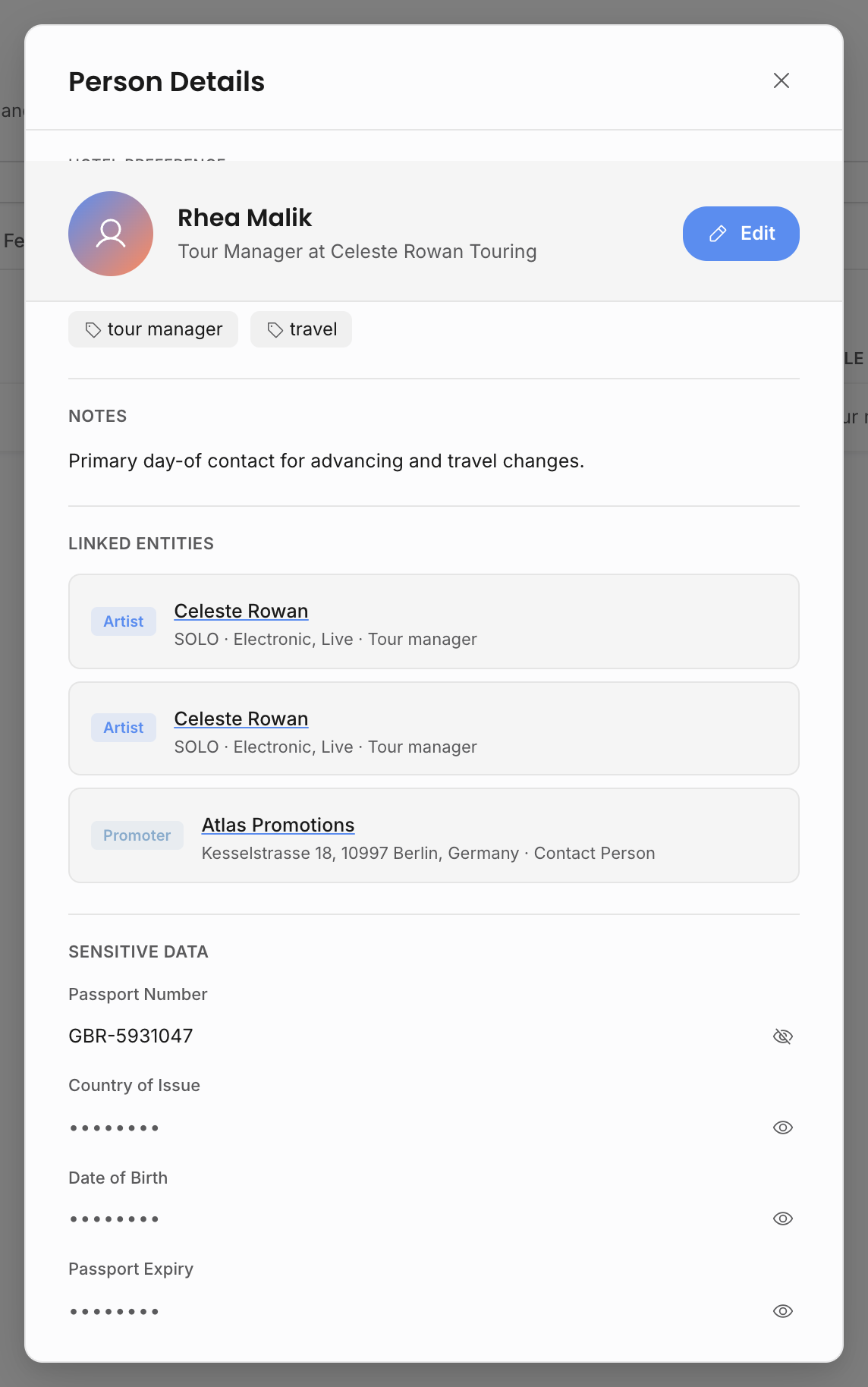
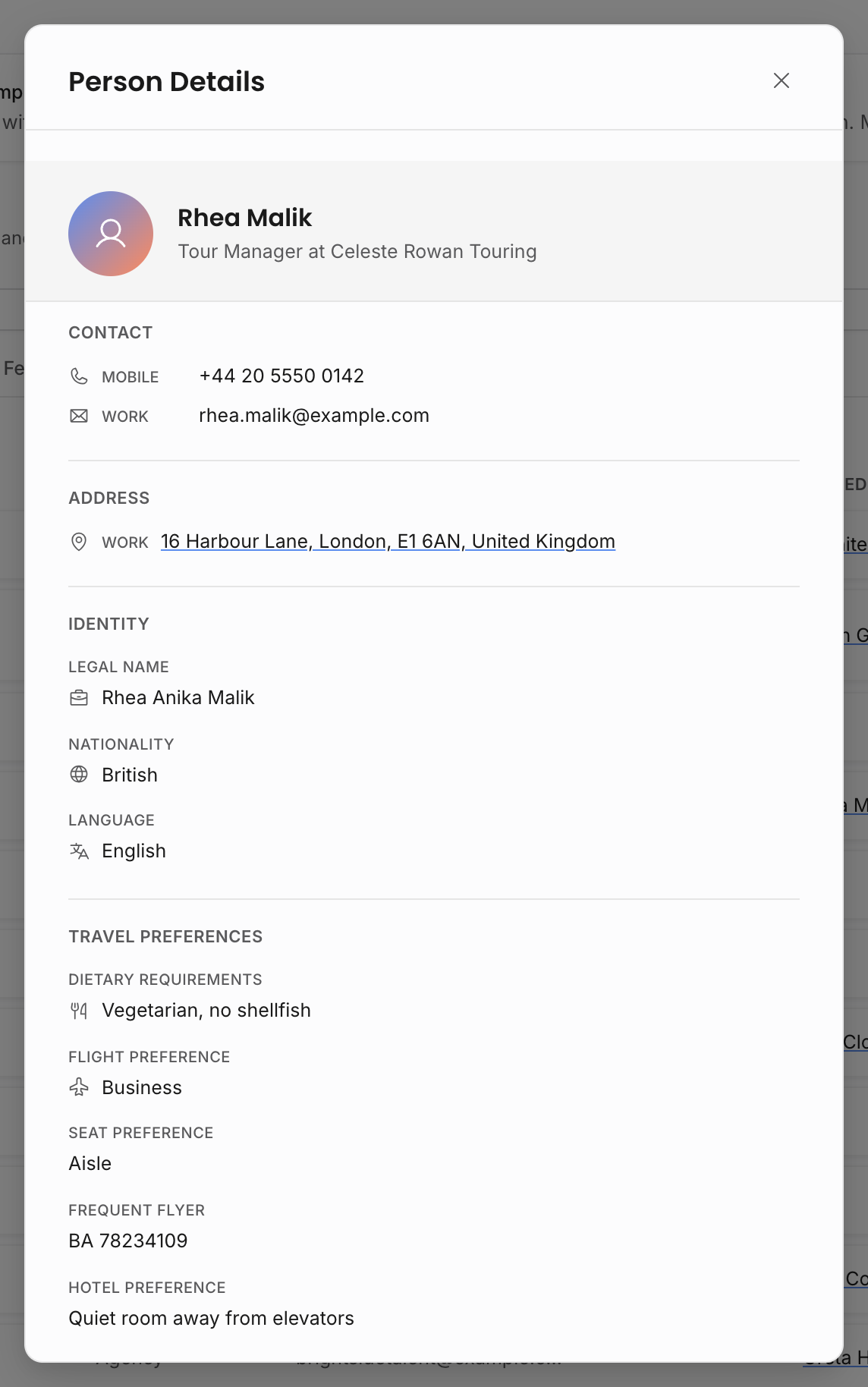
People records can hold more than one phone number, email, social link, and address. They can also hold role, company, job title, legal name, nationality, preferred language, birthday, tags, related names, notes, dietary requirements, travel preferences, frequent flyer details, hotel preferences, and artist or business links.
Use people records for contacts who move between organizations or appear in several contexts. For example, a buyer might be linked to a promoter business and also appear as the day-to-day contact on several events. An artist manager might be linked to the artist but not to a venue or promoter.
Passport number, date of birth, passport expiry, and passport country are sensitive fields. Viewing those values requires View sensitive data. Editing those values requires Edit sensitive data in addition to the normal Contacts edit permission. A user can still see that a person has sensitive data when the row is allowed to indicate it, but the actual values are revealed through the sensitive-field controls only for users with the right access.
This split matters for agencies that need travel data without exposing it to every team member. A booker may be allowed to edit ordinary contact details and relationship links, while passport details remain hidden or read-only depending on role settings. When a user without sensitive edit permission saves a person, ordinary contact fields can update, but sensitive fields are not persisted from that save.
Addresses and geography
Business contacts can have a business address. Venue records can also carry venue-specific address and coordinate fields because a legal or billing address is not always the same as the actual venue location.
Use autocomplete where possible so the city, country, and coordinates are structured. Structured location data helps:
- show records resolve venues consistently;
- analytics maps place venues and cities more accurately;
- tour calendars and documents display useful location information;
- search and filters find contacts by city or country.
If autocomplete cannot find the address, use manual address entry and fill the city/country fields as cleanly as possible.
Billing and banking details
Business contacts can carry billing and payment-related fields such as billing name, billing address, billing email, VAT number, payment terms, bank details, currency, and notes. Use these for counterparties that appear on contracts, invoices, or recurring settlement workflows.
Keep legal/billing details on the contact record when they are stable across multiple shows. Put show-specific exceptions on the show, contract, invoice, or document instead.
Billing email and billing CC emails are especially useful for invoice workflows because the same counterparty may recur across many shows. Banking fields are useful when the contact is a payee, supplier, co-agency, or recurring settlement partner.
Reuse across the app
Address Book records feed many other surfaces:
| Surface | How it uses contacts |
|---|---|
| Shows | Venue, organizer, buyer, contacts, city/country, and location context. |
| Contracts | Counterparty and legal/billing details. |
| Invoices | Billing name, billing email, VAT and payment details, and invoice recipient context. |
| Documents | Live pills and contact tables can reference event, artist, counterparty, and people data. |
| Analytics | Venue, organizer, city, country, and relationship data power rankings, maps, and drilldowns. |
| Travel and accommodation | Hotel contacts and person travel preferences can be reused for linked travel and accommodation workflows. |
Editing sample address-book records adopts them as real workspace data. This matters when sample data is active: adopted contacts are no longer cleared as untouched sample rows.
Permissions
Address Book creation, editing, linking, and unlinking use the Contacts edit permission. Deleting contacts uses the Contacts delete permission. Sensitive person fields use sensitive-data permissions in addition to the normal contact edit permission.
The same Contacts permission group also affects artist records because artists and address-book contacts are both part of the agency's relationship data. That shared permission does not mean the Address Book and Artists pages are the same workflow; it means the role controls both kinds of contact-related editing.
Viewing linked contact details may also be affected by artist scope and document visibility on the surface where the contact appears.
Because contacts can feed contracts, invoices, documents, and analytics, avoid deleting a contact only to hide it from one workflow. Edit the relationship, unlink the person, or fix the source record when the contact is still part of the agency history.
Business records that are already associated with events cannot be deleted from the Address Book. People deletion also removes that person from related lineups and traveller lists. For operational history, unlinking or editing the relationship is usually safer than deleting the person or business entirely.
Related: Create a show, Document sharing, Roles and permissions.